The tech demo uses sprites from Speedball2. There is only set of sprites but each team uses a different palette so the blue palette entries can be changed for example to red. In this demo both palettes are the same (spr1_pal, spr2_pal = “gfx/anim1.nxp” )
The sprites are cut from one image so that the palette order does not change between frames )
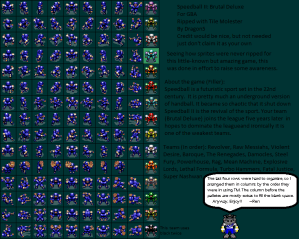
I created this set of frames

from this larger image i found at https://www.spriters-resource.com/game_boy_advance/speedball2/asset/46944/
draw_2x2sprite will place the sprite on screen but will take away MAP_X and MAP_Y so the sprite is drawn relative to the map window.
As the sprite is a 2×2 ( 32×32) the TL sprite is an anchor sprite and other sprites are attached. The sprites are spaced 16 pixels apart and and have an offset sprite index of 1,2,3
The demo uses 40 sprites , 2 teams for 5 players with 4 sprites per player.
Each player is defined by a structure
dw 160-16,MAP_HALF-10-20*2-32
db 0,0
db 0*4
dw anim_1
db 1
db 0 // dma not uploaded
This maps to
SPRITE_X dw ; 16 bit x value
SPRITE_Y dw ; 16 bit y value
SPRITE_FRAME db : animation frame to show
SPRITE_PAL db : palette index to use , eg 0 for team 1 and 1 for team 2
SPRITE_SLOT: db : slot index 0 to 127 of the first sprite
SPRITE_ANIM: dw address of animation
SPRITE_ANIM_TMER db : count down to 0 then move onto the next AANIM frame and reset the timer
SPRITE_FLAG db : when a new FRAME has to be uploaded then this is set to 0 and once done then it is flipped
ANIM_SPEED db :how many frames before moving onto the next frame
ANIM_LAST_FRAME db This is the last to show before it loops back to the first frame
ANIM_FIRST_FRAME db : The first frame
A example Animation is
anim_1 db 6,7,0
This animation frames are 0 to 7 and each one is on screen for 6 VBL’s
In the game the player you will have the sprite drawn for each of the 8 orientations , so then game would use sprite (AnimationFrame *8)+OrientationIndex ( N,NE,E,SE,S,SW,W,NW )
 ZX Next Demos breakdown and ideas